
THE PACKAGING JOURNAL
What Does Collate Mean When Printing? Collated vs Uncollated
Collated copies keep complete documents in page order. Compare the sequences, choose the right setting and plan manuals or guides packed with your products.
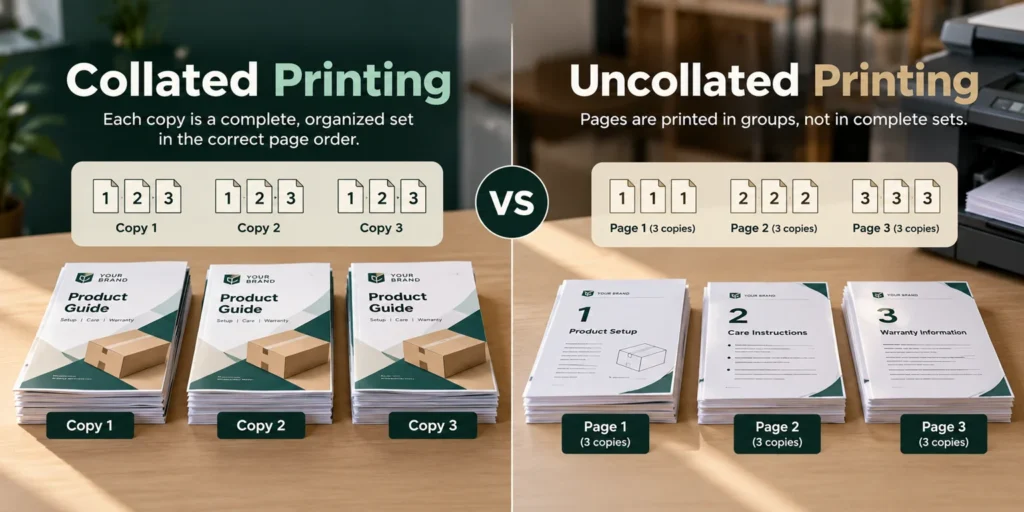
Collate means arranging printed copies into complete sets in page order. If a three-page document is printed three times, collated output is 1–2–3 / 1–2–3 / 1–2–3. Uncollated output groups matching pages: 1–1–1 / 2–2–2 / 3–3–3.
Use collated printing when each person or product box needs a complete document. Choose uncollated printing when separate stacks of identical pages suit the next step. The setting organizes copies; it does not change the design, print resolution or paper quality.
What Does Collate Mean When Printing?
Collating puts the pages belonging to each copy together. It becomes useful when a document has several pages and more than one copy is needed. Instead of assembling every set by hand, the print job produces an ordered sequence for each copy.
Think about the person receiving the pages. A reader needs the beginning, middle and end together. Someone processing identical sheets in batches may prefer each page grouped separately. That difference determines which setting makes sense.
What Is Collated Printing?
Collated printing completes one copy’s page sequence before moving to the next copy. For three copies of a four-page document, the order is:
- Copy 1: 1–2–3–4
- Copy 2: 1–2–3–4
- Copy 3: 1–2–3–4
The result is ready to separate into three complete documents. Stapling, folding or binding may still be needed. Collation establishes the order; those finishing steps hold or shape the pages afterward.
This complete-copy behavior is described in Microsoft’s collate documentation. Treat the sequences here as logical page order, rather than a promise about whether sheets emerge face-up or face-down.
What Is Uncollated Printing?
Uncollated printing produces the requested copies of one page together, followed by copies of the next page. The same four-page job becomes:
1–1–1 / 2–2–2 / 3–3–3 / 4–4–4
All the pages are present, but each stack contains matching pages instead of complete documents. To hand out three full copies, someone must take one sheet from every group and assemble them in order.
That arrangement can be useful rather than mistaken. For example, staff might need a stack of product information sheets at one packing station and a separate stack of warranty sheets at another.
Collated vs Uncollated Printing
| Feature | Collated | Uncollated |
|---|---|---|
| Print sequence | Complete sets | Same pages grouped |
| Two copies of three pages | 1–2–3 / 1–2–3 | 1–1 / 2–2 / 3–3 |
| Useful for | Documents read as a whole | Sheets processed separately |
| Sorting into full sets | Usually less manual work | Assembly needed afterward |
| One-page document | No meaningful order benefit | Same repeated page |
Neither option fixes a badly ordered source file. If page three belongs before page two, correct the document first. Collating repeats the selected document sequence; it does not decide what the reader should see next.
When Should You Collate When Printing?
Choose collated output when each recipient needs the full document in the same order. Common examples include:
- Reports and training documents distributed to a group.
- Multi-page handouts that follow a lesson or presentation.
- Product manuals and assembly instructions.
- Care guides and onboarding packs supplied with a product.
For a packing job, write the requirement as “one complete set per box” rather than just specifying a large sheet quantity. If a guide has three pages and 100 boxes each need one guide, the requirement is 100 complete sets, containing 300 printed pages in total.
When Should You Leave Printing Uncollated?
Leave the job uncollated when matching pages need to remain together. Perhaps one sheet will be stamped, another distributed separately, or different staff will add different sheets during assembly.
It can also suit a job that will be gathered later through a planned finishing process. Confirm the required delivery arrangement with the print supplier. Grouped sheets are helpful only if they match the way the job will actually be handled.
For separate one-page flyers, there is no multi-page sequence to preserve. Collation adds no useful organization to that job.
What Does Collate Mean on a Printer?
A printer’s collate option asks for complete copies instead of batches of matching pages. The label may appear as “Collate,” “Collated” or “Collate Sheets.” Its location depends on the application, operating system, driver and printer.
Apple’s print-options guide explains that available settings vary by printer and app. Avoid assuming that a screenshot from one computer matches every setup.
- Open the final document and its print settings.
- Check the selected page range and number of copies.
- Choose collated or uncollated output for the required arrangement.
- Check two-sided printing and finishing separately.
- Print two sample copies and inspect their order before running the full quantity.
If an application and driver both offer copy controls, avoid setting up the same job twice without checking the preview. Confirm that the final quantity and order match the brief.
Does Collate Matter for One-Page Documents?
Usually, no. A single-page document has no internal sequence to assemble. Five copies are simply five copies of the same page, with collating enabled or disabled.
The distinction also generally disappears when only one copy of a multi-page document is being printed. There are no repeated copies to organize into separate sets. Page range and normal or reverse order can still affect that output.
How Collating Applies to Packaging Inserts and Manuals
A box might contain an instruction guide, a multi-page warranty document or a short product booklet. Delivering those materials as complete sets can make packing easier than supplying loose piles of individual pages.
Keep document assembly separate from the box structure. Custom printed boxes carry artwork on their panels; a folding carton itself is not collated in the same sense as a multi-page manual.
Also distinguish printed literature from a structural insert that holds a product. Our box insert selection guide covers that fit decision. Include the finished manual in the packing sample so its folded size and thickness are considered alongside the contents.
For a quotation, specify document version, finished sets, page order and any folding or binding. State whether literature arrives loose, bundled or already assembled. Do not assume those operations are included just because collated copies were requested.
A Simple Collate Example for Product Guides
Suppose a product needs these three pages:
- Setup: opening and assembling the product.
- Care: cleaning and routine handling.
- Warranty: the relevant product information.
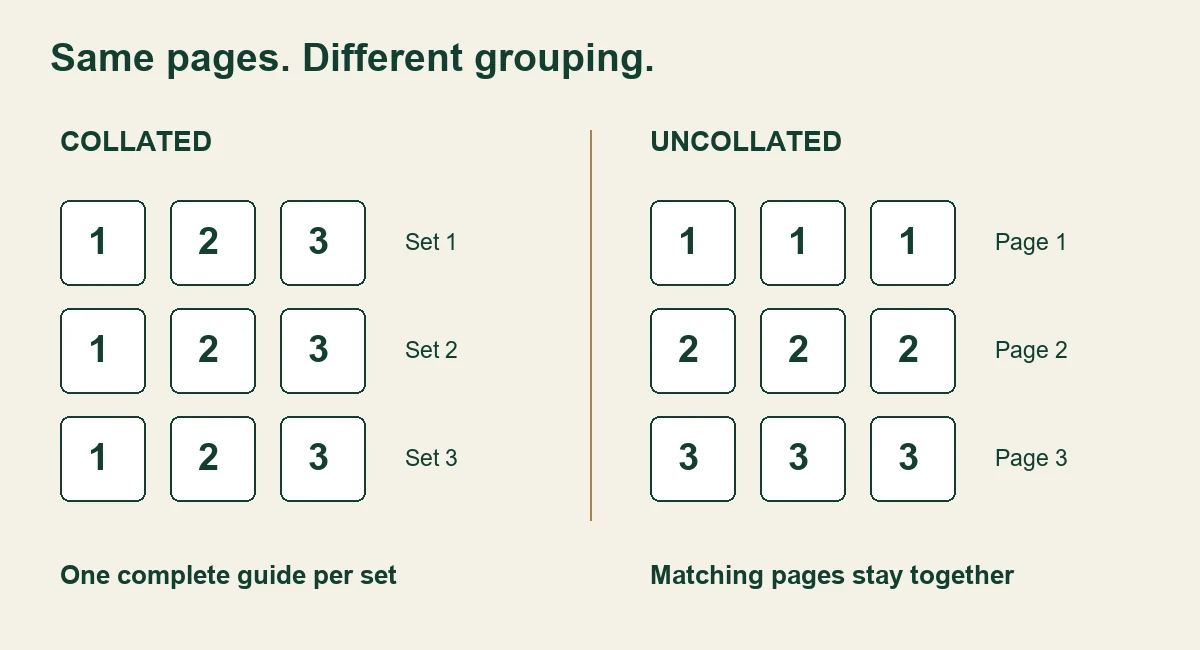
With collating on, each set contains setup, care and warranty in that order. With collating off, all setup pages are grouped together, followed by care pages and warranty pages.
Check a finished sample against the approved file before packing. Collation does not detect an outdated warranty page, an incorrect language version or a missing page in the source document.
Common Mistakes About Collated Printing
- Confusing collate with duplex. Duplex controls printing on both sides; collate controls how copies are grouped.
- Expecting stapled copies. Stapling and binding are separate finishing instructions.
- Expecting better color or lower ink use. Collation alone changes organization, not the artwork or print-quality settings.
- Assuming every job needs it. Grouped sheets can be the right output for a planned assembly process.
Order, printing and finishing should be checked together, but specified separately. The materials and finishes guide addresses other packaging choices without changing what collation means.
Frequently Asked Questions
What does collate mean when printing?
It means grouping copies into complete documents in page order. Three copies of three pages are arranged as 1–2–3 / 1–2–3 / 1–2–3.
What happens if I do not collate?
The job normally groups copies of each page together. If complete documents are needed afterward, the pages must be gathered into sets.
Should I collate when printing manuals?
Usually, if each recipient needs a complete manual. Confirm the required order and any folding, stapling or binding with the supplier.
Does collating matter for a single-page document?
There is generally no organizational benefit because every copy contains only that one page. There are no separate pages to arrange within each copy.
Are collating and stapling the same thing?
No. Collating organizes the pages; stapling fastens them. A collated set can remain loose unless a separate finishing operation is requested.
Can collated printing also be two-sided?
Yes, when the printer and chosen settings support the job. Two-sided printing controls sheet faces, while collating keeps each document’s pages together. Check a sample of the combined settings.
Choose the Order That Fits the Job
Collated means complete ordered sets; uncollated means matching pages grouped together. Choose based on how the pages will be read, finished or packed. When discussing packaging with Custom Boxes Nation, include any manuals or printed guides in the brief so the complete contents can be reviewed together.
KEEP EXPLORING