
THE PACKAGING JOURNAL
What Is Smart Packaging? Types, Examples & Benefits Explained
Compare active, intelligent and connected packaging, understand the role of QR codes and tags, and plan a useful feature that can be tested and maintained.

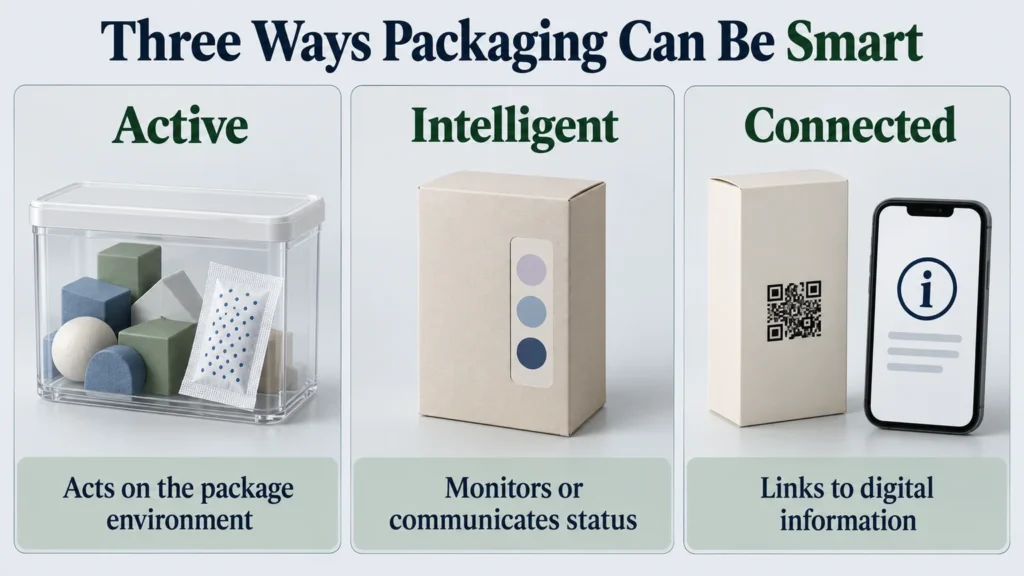
Smart packaging adds a useful function beyond containing and protecting a product. It may act on the package environment, monitor a condition or connect someone to digital information. An oxygen absorber, a temperature indicator and a printed QR code can all belong in the discussion, but they do different jobs.
Start with the problem you need to solve. A buyer looking for setup instructions needs a different solution from a warehouse checking stock or a team monitoring temperature exposure. The useful feature is the one the intended user can access, understand and maintain.
What Is Smart Packaging?
Smart packaging is an umbrella term covering active, intelligent and connected functions. It does not describe one material, one box style or a guaranteed level of performance. A printed carton can carry a digital trigger; another package may incorporate a specialized material or sensor.
The distinction matters when requesting a quote. “Smart” alone does not tell a supplier what to print, insert, measure or integrate. Describe the required function, the person using it and the information or physical change it should provide.
How Does Smart Packaging Work?
A practical system starts with the physical pack and its added element. An active component interacts with the environment. An indicator responds to a condition. A digital code or tag identifies something or opens information.
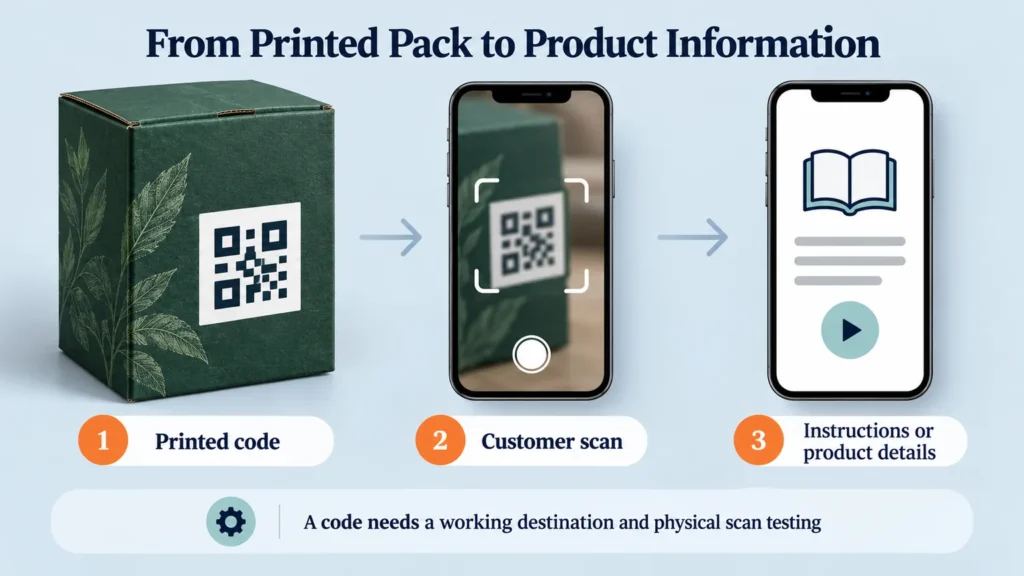
For a connected pack, the destination and data system matter as much as the trigger. A customer can scan a code on a charger carton to reach setup instructions, but the page must remain available and match that product. Printing the code is only one step.
The Main Types of Smart Packaging
Active Packaging
Active packaging interacts with the contents or package environment. Oxygen absorbers and moisture-management components are examples in appropriate applications. The material is doing something, rather than merely reporting information.
EFSA’s explanation of active and intelligent food-contact materials distinguishes these functions. Food applications require assessment of the actual material and intended use; a generic insert is not a substitute for that work.
Intelligent Packaging
Intelligent packaging monitors or communicates condition or status. Examples include time-temperature indicators and appropriately designed freshness indicators. A sensor system may record a condition for later review.
An indicator reports what it was designed to detect. It does not automatically control temperature, prevent damage or establish that every aspect of a product is acceptable.
Connected or Interactive Packaging
Connected packaging links the physical pack to information or an experience, often through a QR code or NFC tag. Instructions, product details and support pages are practical examples. A QR link is not automatically “intelligent packaging” in the technical food-contact sense; it may simply open a webpage.
Common Smart Packaging Technologies
QR codes and GS1 Digital Link: a QR code can encode a web address. GS1 Digital Link uses standardized product identifiers within web-address syntax. GS1 explains how these codes connect packs to product information. An ordinary website QR code does not automatically implement that standard.
NFC: a compatible device can interact with a nearby tag through a tap. The NFC Forum describes this tap-based connection. Tag choice, device compatibility and placement need checking; a tap symbol printed on a box is not an NFC component.
RFID: tags communicate with readers to identify items. GS1 US describes RFID’s tag-and-reader system. Inventory visibility also needs suitable readers, software and usable records. A passive tag alone is not continuous location tracking.
Indicators, sensors and active components: specify the condition to detect or manage, how it will be read and the intended environment. Temperature exposure, moisture and oxygen involve different components. Validation belongs to the complete product-and-packaging system.
Smart Packaging Examples by Use Case
In retail and ecommerce packaging, a printed code can guide customers to assembly instructions or care information. It should lead to a useful product-specific page, rather than asking customers to search again.
For electronics or higher-value goods, an identifier may support product registration or an authentication workflow. A copied code can also be scanned, so authentication requires an appropriate verification system, not merely a visible symbol.
Food and beverage examples include appropriately assessed active components or condition indicators. Healthcare and pharmaceutical teams may use identification or monitoring systems within their established procedures; a generic digital link does not replace required labeling or product-specific review.
For temperature-sensitive shipments, an indicator or logger may document exposure. Monitoring is separate from the insulation or cooling that controls temperature. The phrase “smart temperature-controlled packaging” should therefore prompt a discussion of both functions.
Benefits of Smart Packaging
The benefit depends on the task. Connected information can make instructions easier to access. Suitable identification systems can support traceability or authentication checks. RFID installations can help teams observe inventory movements at equipped reading points.
Condition monitoring can provide information for handling decisions, while appropriate active systems may support shelf-life objectives. These are different outcomes requiring different evidence. A scan count is not proof of customer satisfaction, and none of these features guarantees a commercial result.
Smart Packaging vs Traditional Packaging
| Consideration | Traditional packaging | Smart packaging |
|---|---|---|
| Core role | Contain, protect and present. | Add a defined active, monitoring or connected function. |
| Information | Mainly printed on the pack. | May include indicators, identifiers or digital content. |
| Examples | Printed carton and protective insert. | Code, tag, condition indicator or active component. |
| Complexity | Structure and print production. | May add components, integration and maintenance. |
| Testing | Fit, protection and print. | Those checks plus the added function. |
| End of life | Depends on construction. | Also consider added labels, electronics and adhesives. |
Challenges and Limitations
Budget for the full system: components, integration, testing, hosted content and ongoing ownership. Connected services also need appropriate access controls and clear choices about customer data collection.
Print reliability deserves a physical check. Code size, contrast, clear space around the symbol, folds, coatings and label placement can affect scanning. Confirm artwork with the printer and test a finished proof on intended devices. A successful on-screen scan does not establish production performance.
Added electronics, films or adhesives can complicate material separation. Smart packaging is not automatically sustainable. Compare construction and recovery options as part of the same decision, using our sustainable packaging guide for broader trade-offs.
How to Decide Whether It Fits Your Product
- Define the problem and user: information access, identification, monitoring or environment management.
- Map the system: component, reader or phone, network, data and digital destination.
- Check the physical pack: material, artwork area, placement, assembly and handling.
- Set the test: validate the function under representative use before scaling.
- Assign ownership: name who maintains content, data, access and replacement components.
- Plan disposal: review the complete construction and any separation instructions.
Discuss board and surface choices alongside the added feature. The existing materials and finishes guide provides that physical-packaging context.
Smart Packaging Trends to Watch
GS1’s work on 2D codes and NFC’s tap-based applications show practical routes toward more connected product information. Buyers can also evaluate authentication, traceability and condition monitoring where the supporting system exists. Keep recovery in the design discussion. These are areas to assess, not a prediction that every product needs a sensor or code.
Frequently Asked Questions
What is smart packaging in simple terms?
It adds a defined function to packaging: acting on the environment, monitoring status or connecting someone to digital information.
What are the three main types?
Active, intelligent and connected packaging describe different functions. Intelligent packaging is one part of the broader smart-packaging discussion.
Is a QR code considered smart packaging?
It can create a connected experience when linked to useful content. It does not automatically monitor product condition or provide live tracking.
How are NFC and RFID used?
NFC can support a nearby tap interaction; RFID can identify tagged items at compatible readers. Both need appropriate components and a supporting system.
What are the disadvantages?
Potential drawbacks include added cost, testing, integration, data responsibilities and ongoing maintenance. The feature can fail if its digital destination or infrastructure disappears.
Can smart packaging be sustainable?
Evaluate the complete system. Added components may complicate recovery, so benefits and disposal implications need evidence rather than a general sustainability label.
Start With a Useful Function
Smart packaging works best as a defined project with a clear user, practical test and maintenance owner. The physical box still needs to fit and protect its contents.
For the printed carton, share your packaging brief with dimensions, quantity, artwork and intended use. If the artwork includes a code, ask about placement and physical proofing. Specialized tags, sensors and active systems require separate capability confirmation and integration planning.
KEEP EXPLORING